
The hidden cost of manual ELV take-off: where devices get missed and what one miss costs
A manual ELV take-off rarely fails in a way anyone notices on the day. It fails when one missed symbol on a typical floor is multiplied twelve times and pushes a switch over its ports. This is where the misses hide, an illustrative AED example of what one costs, and the checks that catch them before the tender goes.
- Doc no
- TQ-BLG-261022-J0
- Rev
- Issued
- Author
- Zakaria Syed
- Category
- Take-off
- Reading
- 11 min
The cost of manual ELV take-off is rarely the hours it takes; it is the device that gets missed on a typical floor, multiplied across every floor the sheet stands for, and discovered after award when it has to be supplied at your own cost. Most misses in a UAE, Saudi or Qatar tender come from a short list of places (typical floors, legends, revisions, touching symbols, external references and enlarged plans), and they are caught by checks that compare your count with a second, independent source, not by counting the same sheet again.
This is the risk chapter of the ELV quantity take-off guide: where manual take-off errors come from, an illustrative AED example of what one costs, and the checks that catch them before the consultant's deadline.
Why manual take-off errors are hard to see
A manual take-off does not fail loudly. The spreadsheet adds up, the BOQ looks complete, and the tender goes out on time. The error surfaces months later, when the site team orders against the drawings and finds the quantities do not agree.
Two pieces of research explain why this happens to careful people, not only to careless ones:
- Lapses cannot be trained out. The UK Health and Safety Executive classifies a lapse as forgetting to carry out a step in a familiar task, and says slips and lapses "cannot be eliminated by training, but improved design can reduce their likelihood and provide a more error tolerant system". Counting symbols across sixty sheets is exactly the kind of familiar, repetitive task where lapses happen.
- Checking your own work finds about half. Panko's review of spreadsheet error research (2000) reports that people inspecting a spreadsheet alone caught only about half of the errors, even when experienced, and that omission errors were found at far lower rates. A missed device is an omission: there is nothing on the page to catch your eye.
Neither study is about ELV take-off, and neither gives a miss rate for it. Nobody has published a reliable one, so be wary of any article that quotes a single industry error percentage. What the research does tell us is the shape of the problem: misses are normal, they are omissions, and looking again with the same method finds few of them.
Where devices get missed
These are the places a manual ELV count goes wrong, in rough order of how much damage each one does.
| Where | What happens | Why it is expensive |
|---|---|---|
| Typical floors | One device missed on the typical sheet | Multiplied by every floor the sheet covers |
| Labelled but not drawn | A tag (say CAM-34) with no symbol beside it, often an external reference that did not plot | The count looks complete; nothing is visibly missing |
| Touching symbols | Two cameras back to back, or a reader on each side of a door, counted as one | Hides in the densest areas of the plan |
| Legends | Legend panel symbols counted as devices, or a building-wide legend quantity used as the floor count | Wrong in both directions, and consistent, so it looks right |
| Revisions and addenda | A superseded sheet counted, or a re-issued sheet not re-counted | The whole sheet is wrong, not one device |
| Enlarged plans | A lobby or car park entrance drawn at 1:50 as well as on the 1:100 general plan | Devices counted twice |
| Other disciplines' sheets | Cameras on the external works or landscape drawings, barriers on the civil sheets | A whole area missing |
| Transcription | 18 typed as 81, a row outside the SUM range, a floor pasted twice | Silent, and survives every visual check of the plans |
| Interruption | A half-counted sheet picked up from the wrong place after a call | A category short on one floor |
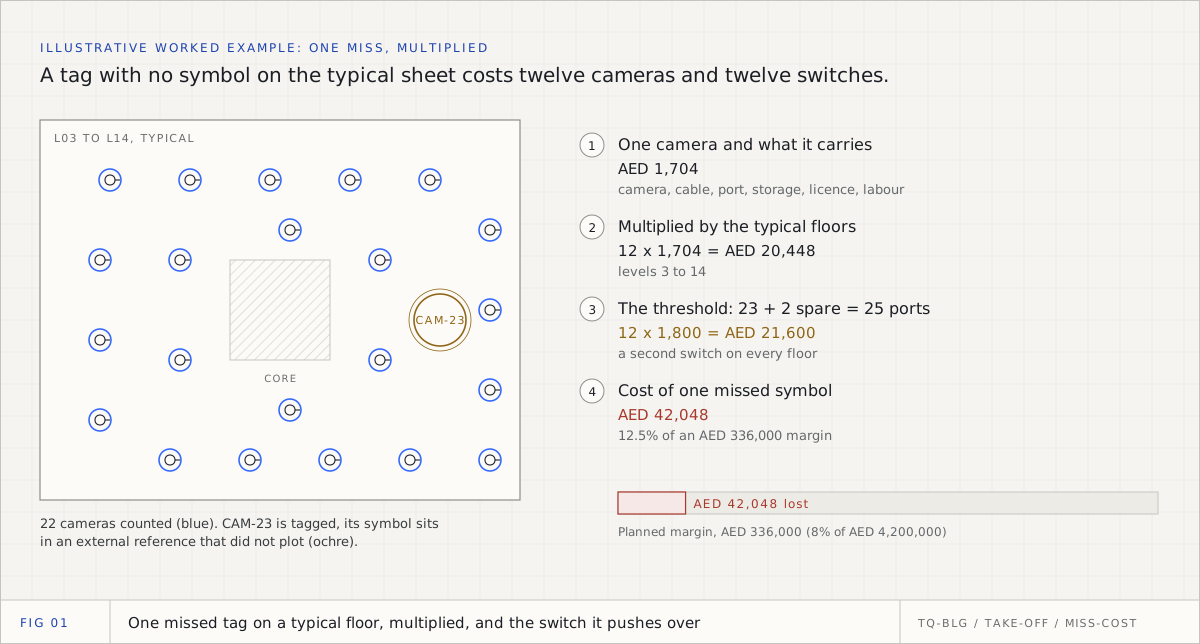
Three of these deserve a closer look because they are specific to ELV.
Typical floors. GCC towers are typical-floor buildings. The sheet for "Levels 3 to 14, typical" is counted once and multiplied by twelve, so every error on it is made twelve times. A typical floor that is not quite typical (a plant room on level 9, a different tenant fit-out on level 12) is the same problem in reverse.
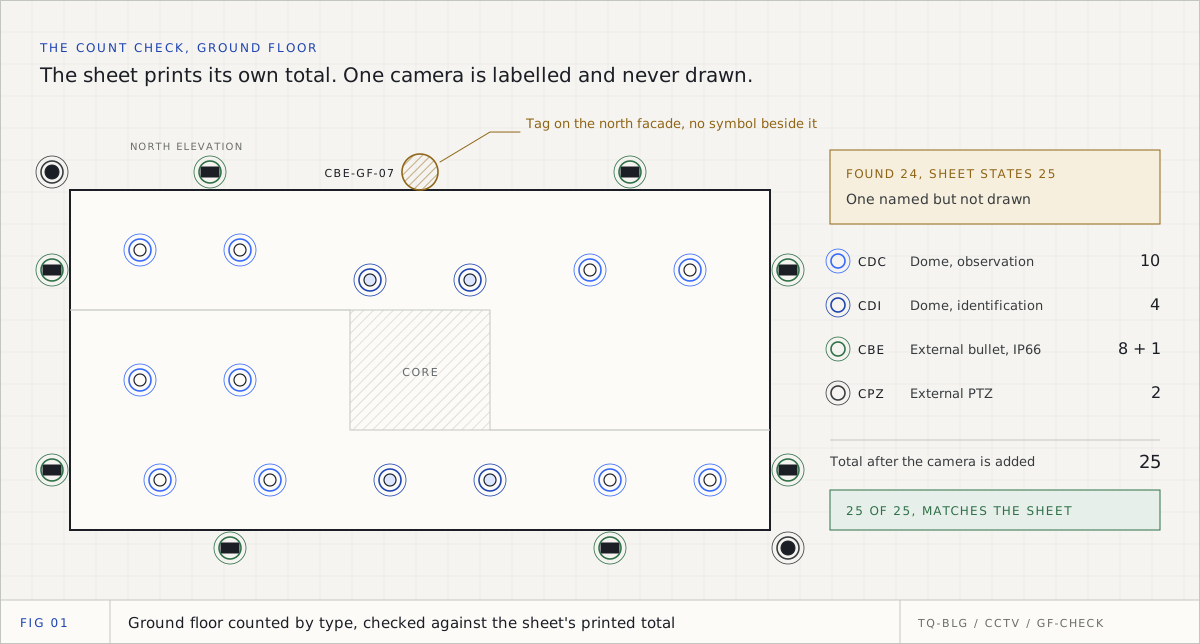
Labelled but not drawn. Consultants often draw devices in an external reference and tag them in the main file. When the reference does not plot, the tag is on the sheet and the symbol is not. If you count symbols, you will never see it. If you count tags, you will.
Touching symbols. Two cameras mounted back to back, or a card reader on each side of a door, are drawn touching. A quick count sees one shape. Zoom in wherever symbols touch, and compare the shapes with the tags. The guide to layers, legends and tag codes shows how to separate them.
What one miss costs: an illustrative AED worked example
The figures below are an illustrative worked example, not market prices and not an industry statistic. Replace every rate with your own before you use the method. The point is the arithmetic, not the numbers.
The project: an office tower in Dubai, levels 3 to 14 drawn as one typical sheet. The firm's rule is one 24-port PoE switch per floor IDF, with at least two ports kept spare.
The miss: the typical sheet shows 22 cameras and one tag, CAM-23, whose symbol sits in an external reference that did not plot. The estimator counts 22. The true count is 23.
Step 1: the device and what it carries
A camera is never only a camera. It carries its cable, its port, its share of storage and its labour.
| Item per camera (illustrative) | Basis | AED |
|---|---|---|
| Fixed dome IP camera, supply | Unit price | 950 |
| CAT6 cable | 45 m at AED 3.20 per metre | 144 |
| Termination, faceplate, patch cord | Per point | 60 |
| Recorder storage share | Per camera at the project's retention | 180 |
| Video management licence | Per channel | 150 |
| Installation, testing, commissioning | Per camera | 220 |
| Total per camera | 1,704 |
Step 2: multiply by the floors the sheet stands for
One camera on the typical sheet is twelve cameras in the building: 12 x AED 1,704 = AED 20,448.
Step 3: the threshold
With 22 cameras, each floor uses 22 ports plus 2 spare, exactly 24: one switch. With 23, it needs 25 ports, so each floor needs a second switch. At an illustrative AED 1,800 for an 8-port PoE switch, that is 12 x AED 1,800 = AED 21,600 more.
Step 4: against the margin
| Line | AED |
|---|---|
| Missed cameras, 12 x 1,704 | 20,448 |
| Extra switches, 12 x 1,800 | 21,600 |
| Cost of one missed symbol | 42,048 |
| Illustrative ELV package value | 4,200,000 |
| Illustrative planned margin at 8% | 336,000 |
| Share of the margin lost | 12.5% |
One tag that nobody saw, on one sheet, takes an eighth of the margin. The step that hurts most is not the camera: it is the threshold. Misses that push a switch, a patch panel, an access control panel or a power supply over capacity add whole pieces of equipment. If the same miss happened on a floor drawn individually, it would cost AED 1,704 and no switch. The typical floor and the threshold are what turn a small error into a large one.
Whether you absorb that cost depends on the contract. On a lump-sum package the contractor usually carries quantity risk; on a remeasured contract the quantities may be measured again. Read the tender's conditions and the measurement preambles, and price the risk accordingly.
The overcount costs too
A double count is the opposite error with a different cost. Count the lobby cameras on both the 1:100 general plan and the 1:50 enlarged plan, or count the legend panel's symbols, and the price goes up for devices nobody will install. That does not show up as a loss on site. It shows up as a tender you did not win, against a competitor who counted the same building correctly.
So the goal is not "count generously to be safe". It is a count you can defend in both directions.
What a manual take-off costs in hours
Hours are the visible cost, and they are worth working out honestly for your own team. A simple model:
| Input (illustrative) | Value |
|---|---|
| ELV plan sheets in the tender | 80 |
| Minutes per sheet to count, record and check | 30 |
| Hours | 40 |
| Second person checking typical floors and totals | 8 hours |
| Engineer hours per tender | 48 |
Multiply by your own internal rate and by the tenders you price in a year. Then set it beside the cost of one miss from the worked example. For most ELV contractors the miss is the bigger number, which is why the checks below matter more than counting faster.
The checks that catch misses
The checks that work all have one thing in common: they compare your count with evidence the first count did not use. Counting the same sheet again uses the same eyes, the same assumptions and the same blind spots.
- The sheet's own total. Many consultants print a total on the sheet ("Total cameras: 73") or a quantity in the legend. Compare. A difference of one is a miss or a double count until proven otherwise. If the consultant's total is wrong, ask in a tender query.
- Tags against symbols. Every device tag needs a counted symbol beside it, and every counted symbol of a tagged type needs a tag. This is the check that finds external references.
- The riser. Cameras on the plans against camera ports on the riser, floor by floor. A riser that serves 24 cameras on a floor where you counted 22 is a question worth asking.
- Floor against floor. Compare each floor with its peers. A zero where other floors have twelve door contacts, or a floor well above the others, gets a second look.
- Enlarged plans against general plans. Mark the areas the enlarged plans cover and count those devices once, on one sheet.
- The revision register. Record the revision of every sheet you counted. When an addendum arrives, re-count the sheets it replaced, not only the clouded areas.
- A second person on every multiplier. The engineer who counted the typical floor should not be the only person who decided to multiply it. Show the sum (22 x 12), never only the total.
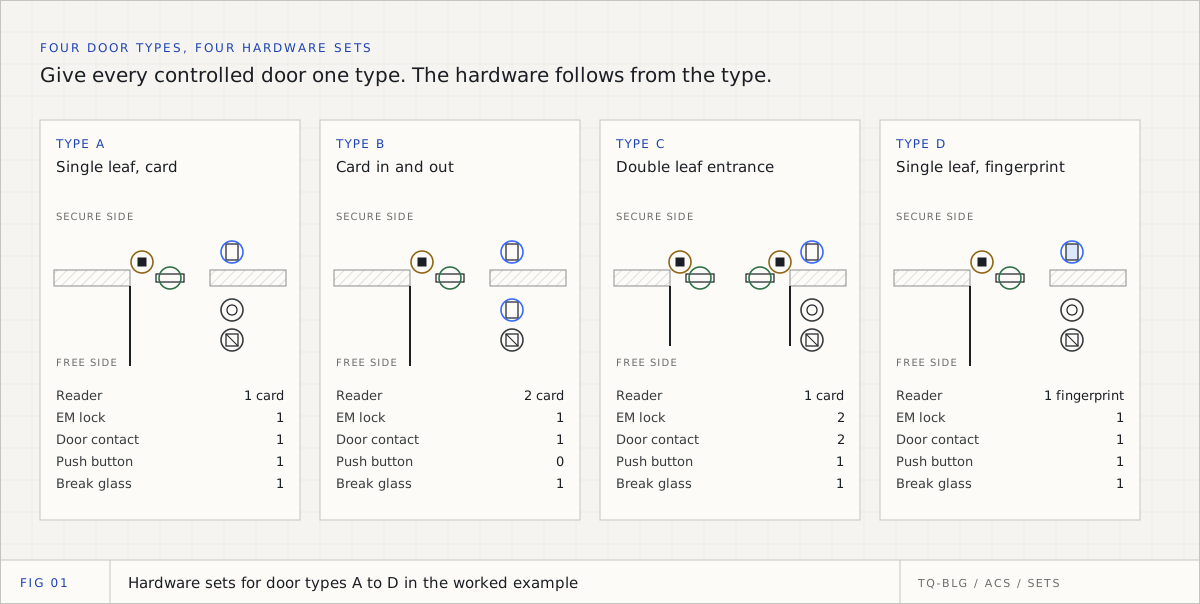
- Door assemblies. For access control, a door with a reader and no lock is a miss, not a design. Count the door, then check its hardware set.
These checks apply on any drawing, but they matter most on the sheets where you could not read layers or tags at all; for those, see take-off from difficult drawings.
How TrueQty runs these checks
TrueQty is built so the checks above happen on the drawing, beside the count, rather than in a separate spreadsheet afterwards. Every count traces to a spot on the drawing, and a person approves it.
- The count check. Where a sheet prints its own total, TrueQty reads it and compares: amber when close (found 72, the sheet says 73), green on an exact match, red when further apart. A riser that prints the project total is checked against all the plans together. The check warns and never blocks, because the consultant's total can be wrong too. See the count check guide.
- Warnings on the drawing. Flags say where to look: a label that names a device with no symbol (the CAM-23 case above), a floor with none of a device its peer floors have, an empty patch in a populated plan, a door with a contact but no lock, a checked device that disappeared when the sheet was read again, and devices routed to a rack beyond its ports. A category counting zero blocks pricing until somebody looks. The full list is in every warning on a drawing.
- Review by category. Each device is circled where it was drawn, and you step through them with N, P and Enter. Take out what is wrong, and add a missed device by hand; it is marked as placed by hand, so anyone can see a person put it there.
- Typical floors with an approval. Marking a sheet as a typical floor shows a preview of the sum, such as 86 x 12 = 1,032, but nothing is multiplied until a team lead approves the multiplier, and the bill shows the sum, not one unexplained total. See typical floors.
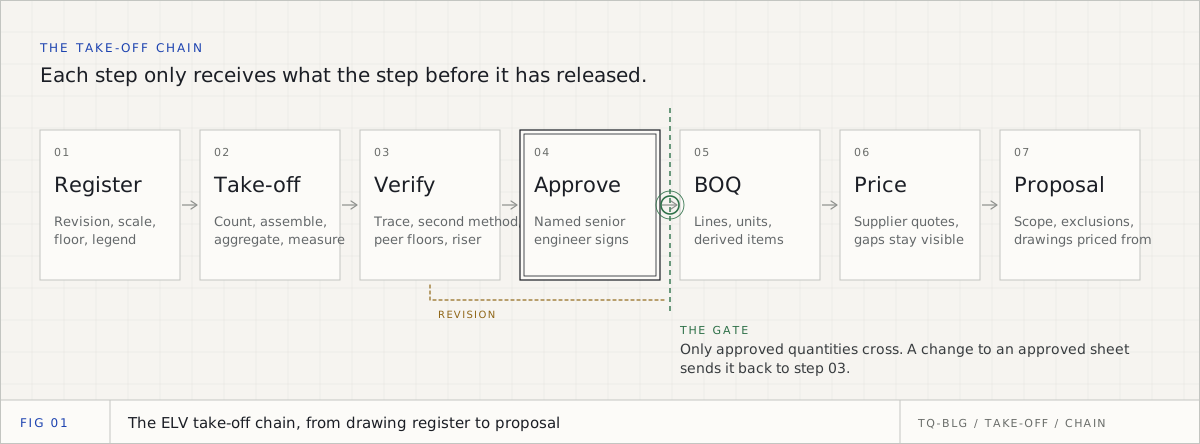
- Sent for pricing only. A team lead sends each sheet for pricing, and only sheets sent for pricing reach the BOQ. If a count changes afterwards, the sheet is withdrawn until it is sent again.
None of this makes a miss impossible. It makes a miss visible: the tag with no symbol is raised as a flag, and the person who sends the sheet for pricing sees it before the number is priced. See how it works for the whole chain, and why the person stays in the loop in ELV take-off automation.
A short checklist before the tender goes
- Every sheet counted is on the register with its revision.
- Every typical-floor multiplier was approved by a second person, and the sum is shown.
- Every category with a printed or legend total agrees, or has a tender query.
- Every tag has a symbol, and every enlarged-plan area was counted once.
- Every floor compared with its peers, and every zero has a reason.
- Every threshold item (switches, panels, power supplies) was recalculated after the last count changed.
A manual take-off is not wrong because people are careless. It is wrong because counting is a task where lapses are normal and self-checks find about half. Build the take-off so that a second, independent source checks every number, and the miss that would have cost an eighth of the margin becomes a flag somebody resolves on a Tuesday afternoon.
Take off one real ELV sheet, with the evidence for every count on the drawing.
14 days, one full ELV tender, no card. Sign up with your work or personal email. You check every count, a team lead approves each sheet, and only approved sheets reach the BOQ.
Questions engineers ask
- Q01What are the most common manual takeoff errors in ELV?
- Devices missed on a typical floor and then multiplied, symbols counted in the legend panel as if they were devices, a superseded revision counted instead of the current one, two touching symbols counted as one, devices tagged but drawn in an external reference, and the same devices counted twice on a general plan and an enlarged plan. Transcription slips when the counts are typed into a spreadsheet come close behind.
- Q02How much does one missed device cost in a tender?
- It depends on the device, the contract and where the miss sits, so work it out for your own rates rather than trusting a rule of thumb. A camera carries its cable, termination, switch port, storage, licence and labour with it, and a miss on a typical floor is multiplied by every floor the sheet stands for. If the extra device pushes a switch, a panel or a power supply over capacity, the miss also adds a whole piece of equipment.
- Q03Why does checking your own take-off not find the misses?
- Because you look for what you expect to see. Research on spreadsheet errors found that people inspecting alone catch only about half of the errors, and that omissions are found less often still. A check that uses a different source of the same number, such as the sheet's printed total or the riser, finds misses that a second look at the same plan does not.
- Q04What checks catch missed devices before pricing?
- Compare your count with an independent total (the sheet's printed total, the legend quantity or the riser), reconcile device tags against counted symbols, compare each floor with its peer floors, de-duplicate enlarged plans against general plans, confirm the revision of every sheet, and have a second person approve any typical-floor multiplier. Each one uses evidence the first count did not.
- Q05Is an overcount as costly as a missed device?
- It costs differently. A missed device costs margin after award, because you supply what you did not price. An overcount costs the tender, because the price is higher than it needs to be against competitors who counted correctly. Double counts usually come from enlarged plans, overlapping sheets and legend symbols, and they are found by the same independent checks.
Sources
Every external fact in this document is cited to one of these, fetched when it was written.

Zakaria is a mechanical engineer and the co-founder and COO of AI Agentiva in Dubai. He builds TrueQty, and writes here about how ELV quantities are counted, checked and priced, and where take-offs go wrong.
Related documents
CCTV take-off from drawings: how to count cameras by type on a GCC tender set
A CCTV take-off is not one number. It is a count of every camera by type, floor by floor, read from tags, layers and legends, checked against the totals the consultant prints and approved before it is priced. This is the method, with a worked 108-camera example.
ELV quantity take-off: the complete guide for GCC pre-sales engineers
An ELV take-off is not one count. It is six kinds of reasoning across CCTV, access control, cabling, fire alarm, PA and intercom, checked before any number is priced. This is the whole process, written for the engineer who has to defend it.
Access control take-off: doors, hardware sets and controllers from tender drawings
In access control the unit is the door, not the device. This is how to build hardware sets per door type, read the door schedule against the plans, count doors by type, derive controllers and power supplies, and check the result before it reaches the BOQ, with a worked 32-door example.