Your tender has more quantities than you think.We find them before you price them.
Turn ELV drawings into verified quantities, a traceable BOQ and a proposal at sell price, with the gaps, assumptions and evidence visible before the number reaches your tender.
Six break glasses counted. And a tag, BG-07, with no symbol beside it: a quantity nobody counted. Add it by hand, then review the other four categories.
Found, unreviewed
Checked by a person
The marker, where you are
Flag: look here
Counted
48
Unrev.
48
Checked
00
Attn.
01
By hand
00
06 break glasses. Are there 6?
- / 06
Unclaimed tag · BG-07
A device tag with no counted symbol nearby, so a symbol is probably missing. Flags never change a count. They ask you to look.
Ready for pricing when
Met: It has counted devices
Not met: Every category checked by a person · 0/5
Met: No zero-count category has an open missing-devices finding
Not met: A team lead or admin has signed
You’re reviewing as a junior. Juniors can do everything except sign. Who signs?
1 to 5 category · N/P step · A add by hand
Sheet redrawn for this page. You are the reviewer: check categories, add what was missed, and see how far a junior can take it. The door contacts, locks, push buttons and face readers match a real UAE ground floor, where they matched the client’s BOQ exactly.The break glasses and the BG-07 flag are illustrative.
02The problem
A quantity can be correct and still be wrong.
The expensive error is rarely the number that looks wrong. It’s the one nobody questioned.
A spreadsheet stores a number. It can’t tell you what you failed to count.
L03 · cameras0A floor that came back empty. Empty, or nobody looked?
GF · break glass6The seventh is in a reference file the PDF never carried.
GF · network devices81The riser only has 72 ports. That's on another sheet.
CAT6 · metres9,795Copied twice. Nobody knows which drawing it came from.
03The chain
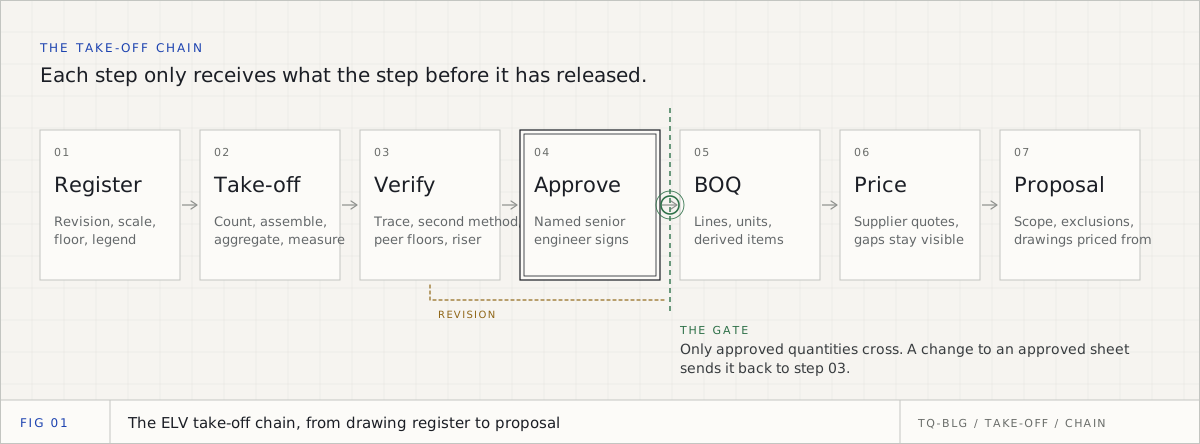
One camera, from missing to priced.
Follow a single quantity through the whole chain: found, added, reconciled, signed, billed, priced and traced back. Scroll, and the drawing follows. The project is a sample.
01Missing
A tag with nothing beside it.
CAM-034 is on the sheet. The camera isn’t: it was drawn in a reference file the PDF never carried. Instead of reporting 72 and moving on, the platform puts a cloud around the tag.
TrueQty/Review/E-L02-SEC-01
Sample project
Approved · team lead
Counts by floor · CCTV · L02
Cameras counted72
Flagsunclaimed tag · CAM-03401
02Added
Counted by hand, and marked as such.
The reviewer places the camera. It’s tagged By hand, so nobody later mistakes it for something the drawing proved.
TrueQty/Review/E-L02-SEC-01
Sample project
Approved · team lead
Counts by floor · CCTV · L02
Cameras counted73
By handCAM-03401
Flags00
03Reconciled
Now the riser disagrees.
73 cameras, 72 switch ports. Finding one device exposed a capacity problem on a different sheet. The plan and the riser are read side by side, so it shows before it’s priced.
TrueQty/Review/E-L02-SEC-01
Sample project
Approved · team lead
Reconciliation · L02
Cameras on the plan73
Switch ports on the riser72
Without a portCAM-03401
04Signed
A person owns the number.
Every category is checked by a reviewer, and a team lead approves the sheet before anything is priced.Read the drawing again and it is no longer approved. The checks stay.
TrueQty/Review/E-L02-SEC-01
Sample project
Approved · team lead
Sign-off · L02
Cameras checked by a person73 / 73
Approved byTeam lead
If the drawing is read againWithdrawn
05BOQ
The count becomes a BOQ, with its working.
Only approved sheets flow into a versioned BOQ.Every cable run shows its arithmetic and says whether it was measured or averaged.
CAT6 cable, all camera runs73 × 38 m × 1.103,052 m
06Priced
A gap stays a gap.
Each line takes the cheapest eligible vendor from your own price lists.A line nothing matched stays visible, and the total reads Total so far until it’s resolved.
TrueQty/Review/E-L02-SEC-01
Sample project
Approved · team lead
BOQ · v1 · priced
Camera, fixed dome · Vendor B · 410.0029,930.00
CAT6 cable · Vendor A · 2.35 / m7,172.20
Mounting bracketGap · nothing matched
Total so farAED 37,102.20
07Traced
Click 73. Land on CAM-034.
Every quantity opens back to the take-off, the sheet and the mark on the drawing, including the one somebody added by hand.
The missesOne break glass or card reader per floor, drawn in a reference file the PDF never carried. Each surfaced as a flag, not a confident wrong number.
·Accuracy %Not measured yet, so not printed. In the product a dot means the drawing is missing. Here it means the benchmark is.
Currency
AED by default, set per company
Foreign price lists
Converted to your currency. No rate means dropped, never assumed at parity.
Supplier files
CSV, XLSX, XLS and PDF, with Arabic column headers read
Typical floors
Mark a sheet ×N for repeated tower floors; a team lead approves it
Device types as columns in the main contractor's wording, floors as rows, a tab per system
Packages
Security, ICT, AV & BGM and home automation taken off by their own teams, joined into one BOQ
Markup
Overall, per package or per line. The client copy and the proposal show sell price only
Cabling standard
90 m permanent link (TIA-568 / ISO 11801) checked on every run
Data region
Defaults to Dubai
Consultant conventions
Tuned on a UAE consultant's standard; new ones are added as configuration
Arabic interface
Right-to-left foundation built; English today
CCTVRead from drawing
Access controlRead from drawing
Structured cabling / ICTRead from drawing
IntercomRead from drawing
PA / BGMPartly read
AVCounted by hand
Fire alarmCounted by hand
Building controlsCounted by hand
Four ELV systems are read from the drawing and PA partly; AV, fire alarm and building controls are counted by hand on it, inside the same take-off.The chain is built to extend beyond ELV, one discipline at a time.
05Comparison
AutoCAD can count. That’s not the question.
You can count a block in about a minute. We compete on what happens after the count.
Selection in CAD
TrueQty
Selects similar objects
Reads the sheet and the riser, and reconciles them
Answers the count you asked for
Looks for what you didn't ask about
Highlights what you selected
Keeps the evidence behind every number
You decide the result is complete
A review and sign-off gate decides
The number gets copied somewhere else
The number flows into the BOQ
No commercial context
Supplier pricing, markup and the proposal on the same chain
Excel is where the number goes. Not where it starts.
Today, usually
Drawing→
Count by hand→
Spreadsheet→
Copy→
Another spreadsheet→
Supplier PDF→
Tender
The source is lost at the copy
With TrueQty
Drawing→
Review→
Approve→
BOQ→
Supplier price→
Markup→
Proposal
You still get Excel: BOQ by floor, the BOQ at sell price for your client, the costs and margin for you, and the cable schedule. It just isn’t where the evidence goes to die.
06Engineering desk
Engineering desk
From the engineering desk
Take-off, BOQ and cabling, written for GCC estimators.
An ELV take-off is not one count. It is six kinds of reasoning across CCTV, access control, cabling, fire alarm, PA and intercom, checked before any number is priced. This is the whole process, written for the engineer who has to defend it.
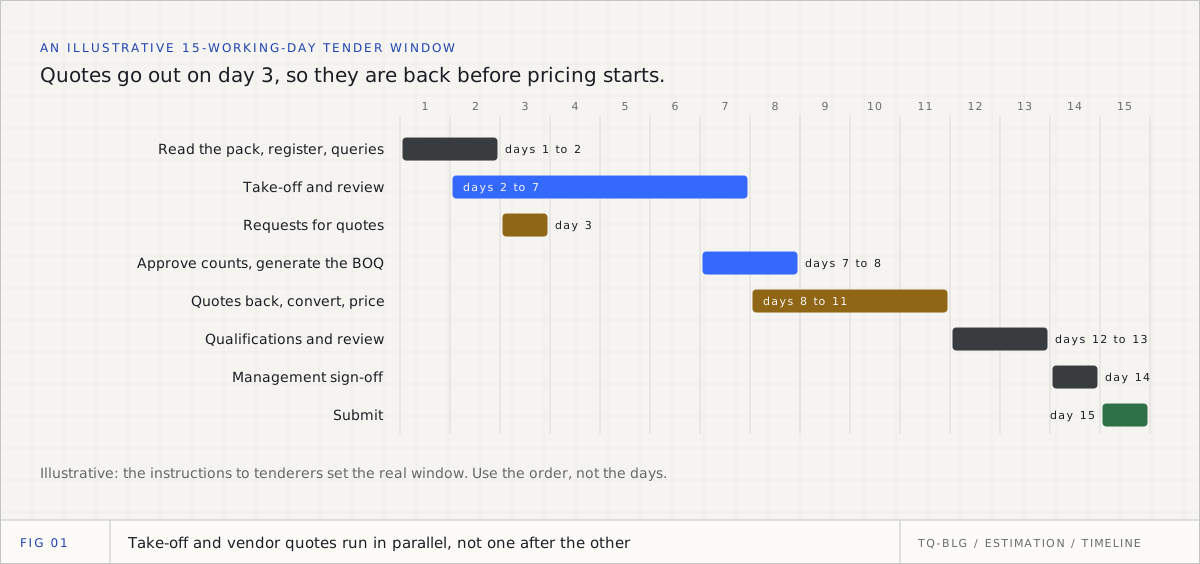
How an ELV tender is estimated in the UAE, step by step: what is in the consultant's tender pack, how the quantities are built, how USD and EUR vendor quotes become an AED price at a stated rate, VAT, quote validity, qualifications, software cost and where your drawings are stored.
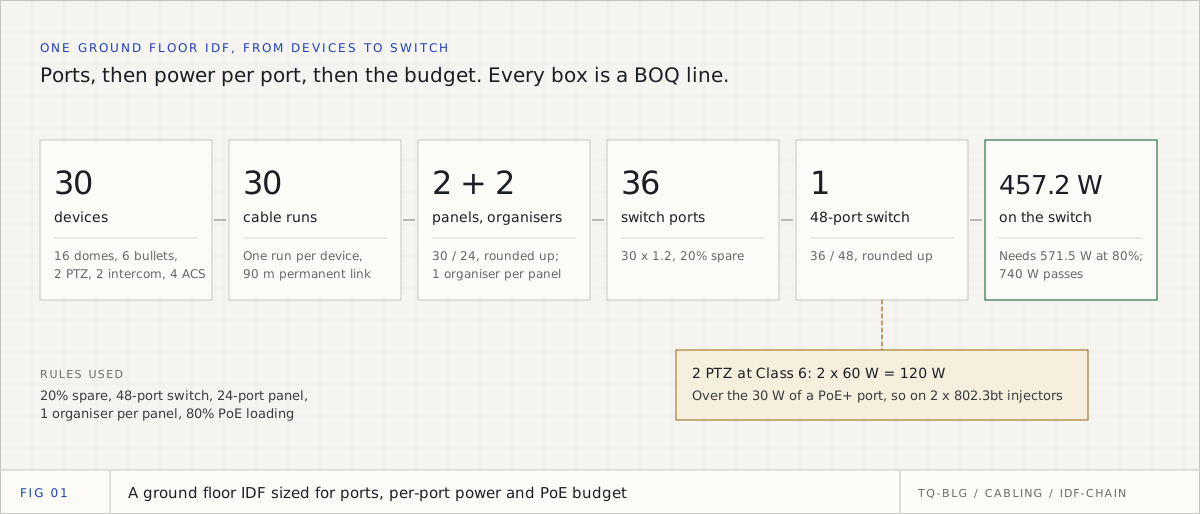
Switches for a CCTV system are sized three times over: by ports, by the power each port must give, and by the power the whole switch can give. Then the patch panels, organisers and rack follow. One ground floor IDF, worked through with the IEEE numbers.
11 min
07Start here
Bring us one drawing.
Pick a tender your estimators already know how to price. We’ll show you what the platform reads, what it flags, and where every quantity comes from.
From AED 990 a month for an estimating department, every ELV discipline included. See pricing
What to bring
Vector PDF from CAD
The best input. Read straight from the sheet.
DXF
Read, but the review screen cannot show it. Upload a PDF exported from CAD (most accurate), or convert the sheet to PDF here and check every count against it.
Flattened PDF
Read from the sheet's geometry. Repeated symbols are grouped; you name each shape once.
Scanned PDF
You mark one symbol, it finds the matches, you name each group.
DWG
Read, but the review screen cannot show it. Upload a PDF exported from CAD (most accurate), or convert the sheet to PDF here and check every count against it.
This page makes
0
claims
Shipped
0
Partial
0
Sample
0
Planned
0
Unverified
0
Every claim on this page was checked against the product brief, a read of the codebase updated on 9 November 2026.