
How many PoE switches for CCTV: the switch, PoE budget and patch panel calculation
Switches for a CCTV system are sized three times over: by ports, by the power each port must give, and by the power the whole switch can give. Then the patch panels, organisers and rack follow. One ground floor IDF, worked through with the IEEE numbers.
- Doc no
- TQ-BLG-261022-K2
- Rev
- Issued
- Author
- Zakaria Syed
- Category
- Cabling
- Reading
- 11 min
To work out how many PoE switches for CCTV a project needs, count the devices that take a switch port on each IDF, add a spare percentage, and divide by the switch size, rounded up, per rack. Then check the result twice more: every port must deliver its device's PoE class, and the switch's total PoE budget must cover all of them with headroom. Patch panels, cable organisers and the rack follow from the same per-rack count.
On a UAE, Saudi or Qatari tender this arithmetic sits in the lines the consultant never draws: the drawings show cameras, and the BOQ has to carry switches, panels, cabinets and fibre priced in AED. It is one step in the chain the ELV quantity take-off guide describes, the step between the device count and the bill.
The three questions a switch has to pass
Most switch counts in tender BOQs are right on ports and wrong on power. A switch is only adequate if it passes all three of these at once:
| Check | The question | Where the number comes from |
|---|---|---|
| Ports | Are there enough ports on this rack, with spare? | Device count per IDF, plus the firm's spare rule |
| Per-port power | Can each port give the class its device needs? | The device's PoE class, and the IEEE limit for the port type |
| Total budget | Can the switch power every port at once? | Sum of the allocated power, against the switch data sheet |
Ports are a counting job. Per-port power and budget are a reading job: the camera data sheet gives the class or maximum draw, and the switch data sheet gives the budget. Neither number is on the drawing, so both are assumptions until a product is chosen. Write them down as assumptions.
The IEEE numbers you need
PoE power is defined at two ends of the cable: what the switch (the PSE, power sourcing equipment) puts out, and what the camera (the PD, powered device) can use after cable loss. Size switches on the PSE column. These are the figures from the Ethernet Alliance's overview of IEEE 802.3bt, which was approved by the IEEE Standards Board in September 2018:
| Standard | Type | Class | Pairs | Power at the switch (W) | Power at the device (W) |
|---|---|---|---|---|---|
| 802.3af | Type 1 | up to 3 | 2 | 15.4 | 13 |
| 802.3at (PoE+) | Type 2 | up to 4 | 2 | 30 | 25.5 |
| 802.3bt | Type 3 | 5 | 4 | 45 | 40 |
| 802.3bt | Type 3 | 6 | 4 | 60 | 51 |
| 802.3bt | Type 4 | 7 | 4 | 75 | 62 |
| 802.3bt | Type 4 | 8 | 4 | 90 | 71.3 |
The lower classes carry over: Class 1 is 4 W at the switch and Class 2 is 7 W. A fixed indoor dome usually declares Class 2 or 3. An outdoor bullet with IR and a heater is often Class 4. A PTZ with a heater, a multi-sensor camera or a camera with a built-in illuminator can need 802.3bt.
Typical or maximum power
Size on maximum. Axis puts it plainly in its white paper on camera power: the maximum figure reflects the camera under worst-case conditions of temperature and supply voltage, during a momentary peak, and it is the value to consider when selecting switches. Typical power is the figure for an energy estimate. For an outdoor camera in the Gulf, worst case means IR on at night and, for a heated model, a cold desert winter morning.
There is a second reason to use the class figure. Many switches reserve a port's full class power when the camera connects, whatever it actually draws. If the switch allocates by class, the budget is spent by class, so the BOQ should be too. If the specification names a switch that allocates by measured draw, you can use the camera's maximum figure plus cable loss, and say so in the assumptions.
Worked example: one ground floor IDF
The numbers below are a worked example, not a real project. One ground floor IDF in a mid-rise office building serves this take-off:
| Device | Count | Takes a port? | Assumed PoE class | Power at the switch, each (W) | Allocated (W) |
|---|---|---|---|---|---|
| Indoor fixed dome | 16 | Yes | Class 3, 802.3af | 15.4 | 246.4 |
| External IR bullet with heater | 6 | Yes | Class 4, 802.3at | 30 | 180.0 |
| External PTZ | 2 | Yes | Class 6, 802.3bt | 60 | 120.0 |
| Video intercom door station | 2 | Yes | Class 3, 802.3af | 15.4 | 30.8 |
| Access control door controller | 4 | Yes | Local power supply | 0 | 0 |
| Total | 30 | 30 ports | 577.2 |
The door controllers take a network port each but are powered from their own supply, because SIRA's specification asks for a control panel battery that lasts at least four hours, which a PoE port does not give. The field devices at each door (reader, lock, contact, exit button, break glass) home to the controller, not to the switch, so they add no ports at all. Counting them as ports is the most common way a security BOQ ends up with switches nobody needs.
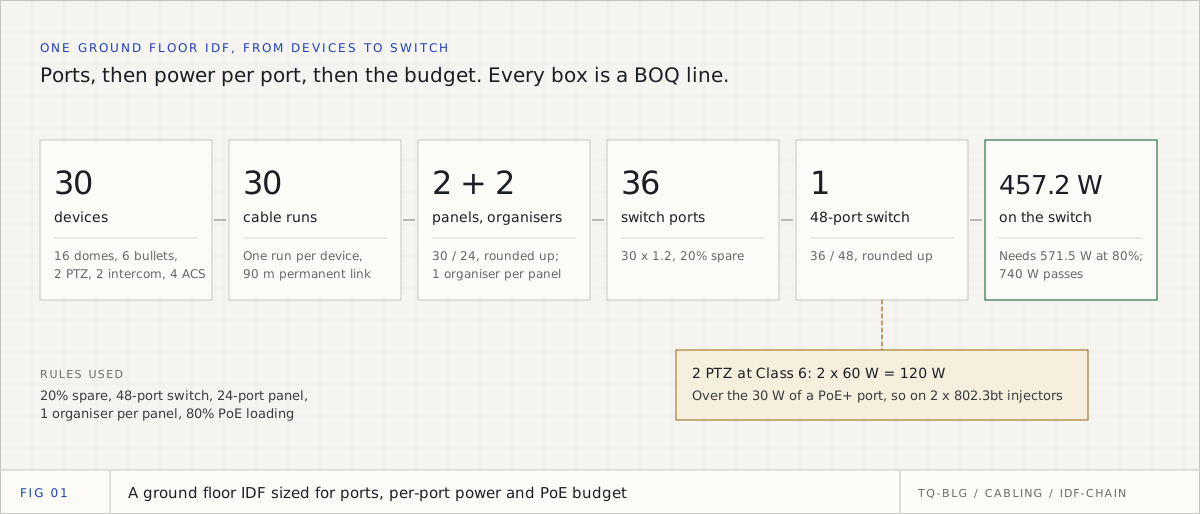
Step 1: ports, with spare
Thirty devices take thirty ports. The firm's rule in this example is 20 percent spare, applied to the port count before choosing the switch, so the spare is real capacity and not an accident of rounding:
- Ports required = 30 x 1.2 = 36
- With 48-port switches: 36 / 48 = 0.75, rounded up = 1 switch (48 ports, 18 free)
- With 24-port switches: 36 / 24 = 1.5, rounded up = 2 switches (48 ports, 18 free)
Either is valid. Which one depends on the firm's standard switch and the specification, and that is exactly why ports per switch should be a written rule, not a habit.
Step 2: per-port power
Twenty-eight of the thirty devices need 30 W or less, which any PoE+ port gives. The two PTZ cameras need Class 6, 60 W at the switch, which only an 802.3bt Type 3 or Type 4 port gives. There are two honest answers:
- Specify a switch with at least two 802.3bt ports, and carry the PTZ power in its budget.
- Keep a PoE+ switch, and add two 802.3bt midspan injectors (each 60 W or more) as separate BOQ lines. The PTZ data still passes through, so the switch port is still used.
This example takes option 2, because it keeps the main switch a standard model. Write the choice into the BOQ line description, so the supplier cannot quote a PoE+ switch and leave the PTZs dark.
Step 3: the PoE budget
With the PTZs on injectors, the switch carries 246.4 + 180.0 + 30.8 = 457.2 W of allocated power. A common firm rule is to load a switch to no more than 80 percent of its budget, which leaves room for a camera added in a variation and for the switch running hot in a plant room:
- Budget needed = 457.2 / 0.8 = 571.5 W
Real switch data sheets show why this matters. Cisco's Catalyst 1000 data sheet lists its 48-port PoE+ models at two budgets: 370 W and 740 W. Both have the same 48 ports. Only one of them works here:
| Switch budget | Load | Loading | Result |
|---|---|---|---|
| 370 W | 457.2 W | 124% | Fails: cannot power all ports at once |
| 740 W | 457.2 W | 62% | Passes: 80% of 740 W is 592 W |
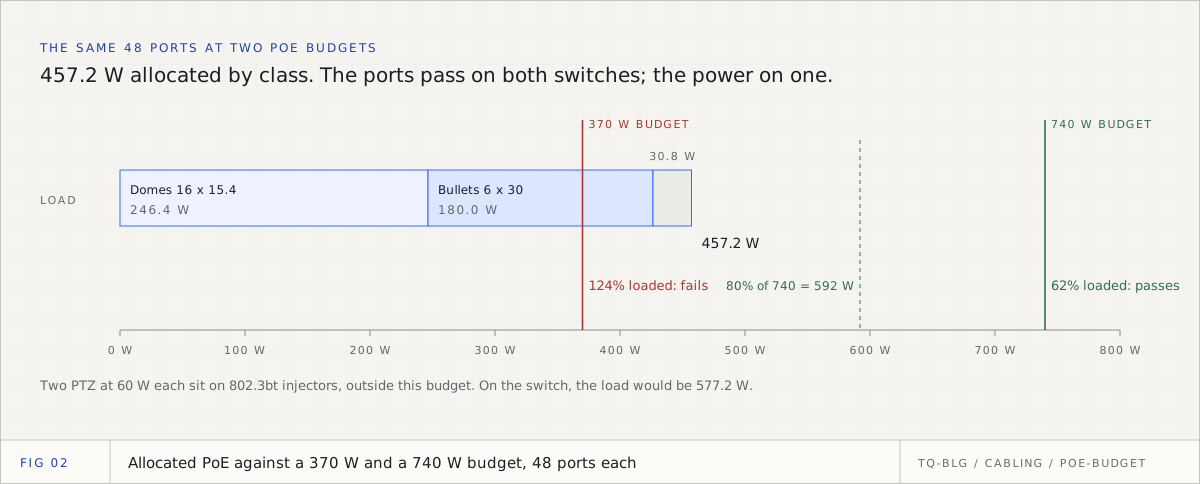
If the PTZs had gone on the switch instead, the load would be 577.2 W and the budget needed 577.2 / 0.8 = 721.5 W: still inside a 740 W switch, but only just, and only if those two ports are 802.3bt.
Step 4: patch panels and organisers
Every device has a horizontal cable, and every cable terminates on a patch panel port, whether or not it has PoE. Panels are counted from cable runs, not from switch ports:
- Patch panels = 30 runs / 24 ports = 1.25, rounded up = 2 panels (48 ports, 18 free)
- Cable organisers, at one per panel = 2
Some firms also add an organiser per switch; what matters is the same rule on every project. Each run is also limited by length: a permanent link of 90 m inside a 100 m channel, as Fluke Networks sets out. PoE does not extend that limit. The ELV cable calculation guide turns those 30 runs into metres and boxes.
Step 5: the rack
Rack size is the one line in this chain that is usually fixed by the specification (for example, a 42U floor-standing cabinet in every IDF). When it is not, add up the rack units and leave growth space:
| Item | Rack units |
|---|---|
| 2 copper patch panels, 24-port | 2U |
| 2 cable organisers | 2U |
| 1 access switch, 48-port | 1U |
| 1 fibre patch panel for the uplink | 1U |
| 1 shelf for the 2 PTZ injectors | 1U |
| 1 horizontal PDU | 1U |
| Total | 8U |
At a firm rule of 50 percent free space, 8U becomes 12U, so a 12U wall-mounted cabinet is the minimum and a larger one is the safer price. If the CCTV UPS sits in the same cabinet, add its height before choosing. The UPS itself, sized to SIRA's minimum of 30 minutes, is worked through in the CCTV BOQ for Dubai.
Step 6: the backbone
Each IDF connects to the main equipment room (MER) by a fibre link. With one IDF on each of seven floors and the MER, the building has 8 racks, so 7 backbone links. At an assumed 40 m per link that is 280 m of fibre, before the riser drawing gives real lengths. Where the riser is drawn, measure each link from it instead of using one average: a link to the top floor is always longer than one to the first.
The result, as BOQ lines
| Ref | Description | Unit | Qty | Basis |
|---|---|---|---|---|
| N.01 | Access switch, 48-port PoE+, PoE budget at least 571.5 W | No. | 1 | 36 ports with 20% spare; 457.2 W at 80% loading |
| N.02 | PoE injector, 802.3bt, at least 60 W per port | No. | 2 | 2 PTZ at Class 6 |
| N.03 | Patch panel, 24-port, Cat6 | No. | 2 | 30 runs / 24 |
| N.04 | Cable organiser, 1U | No. | 2 | 1 per patch panel |
| N.05 | Fibre patch panel, 1U | No. | 1 | 1 uplink |
| N.06 | Wall-mounted cabinet, 12U minimum | No. | 1 | 8U used, 50% free |
The device lines come from the take-off, counted the way the CCTV take-off from drawings describes. The lines above come from rules: 20 percent spare, 48-port switches, one organiser per panel, 80 percent PoE loading, 50 percent free rack space, 40 m per link. None comes from a standard, so two estimators who choose differently produce two bills from the same drawings. Set them once per firm, override them per project only where the specification says so, and show them on every bill, as ELV BOQ rules for GCC contractors explains.
Common mistakes in CCTV switch sizing
| Mistake | What it costs | The check |
|---|---|---|
| Counting door field devices as ports | Extra switches nobody needs | Only IP devices and controllers take a port |
| Sizing ports per building, not per rack | Short ports on busy floors, waste on quiet ones | Calculate every IDF separately |
| Sizing power on typical draw | Cameras drop at night, when IR comes on | Use maximum draw, or the declared class |
| Checking the budget, not the port | PTZs dark on PoE+ ports | Compare each device's class with the port type |
| Switch named by port count only | Supplier quotes the low-budget model | State the PoE budget in the description |
| Panels counted from switch ports | Panels short, because not every run is PoE | Count panels from cable runs |
| Rack size guessed | A cabinet that cannot take the UPS | Add up the rack units first |
How TrueQty does this step
TrueQty derives the switch, patch panel, organiser and backbone lines from the drawings sent for pricing, per floor, using your firm's BOQ rules. A camera, an IP intercom or an access control controller counts as one port; a reader, lock, contact, exit button or break glass counts as none, because it homes to the controller. The rules are in Settings, then BOQ rules: ports per access switch, switch spare capacity, patch panel capacity, cable organisers per patch panel, racks per project and fibre backbone length per link, each saying whether it is the default or your value. The defaults match the example above: 48-port switches, 20 percent spare, 24-port panels, one organiser per panel and 40 m per link.
A bill already generated keeps the rules it was built with, and the rules strip says when one has changed, until you click Regenerate. A project whose specification differs gets its own value under Project rules, marked (project) on the bill. Every derived line shows its formula, so a reviewer can see 30 x 1.2 = 36 ports, not just "1 switch". The BOQ rules guide shows each of these in its video.
When the riser is filed as a PDF, TrueQty reads the racks and switches from it, and the system view puts each floor's devices on the rack that serves it. Each rack is a reading for a person to check with Check this reading, such as "Level 01: 48 of 72 ports used, 24 spare", and a rack with more devices routed to it than ports is flagged instead of being priced quietly. A riser uploaded only as DWG or DXF cannot be shown, so its racks cannot be checked and stay out of the bill; export it to PDF. Once the riser and the cable schedule give real quantities, the bill uses those instead of the estimating rules. The riser and system view guide walks through it, and the cable schedule guide shows the run per device and the 90 m check.
TrueQty does not calculate the PoE budget. It counts the ports; the per-port class and the budget are checked by the engineer against the switch data sheet, with the arithmetic above. Every count traces to a spot on the drawing, and a person approves it. See how it works for the whole chain.
A checklist for each IDF
- Device count by type, per IDF, from the approved take-off.
- Which devices take a port, and which home to a controller.
- Ports with the spare rule, then switches by the firm's switch size.
- Each device's PoE class against the port type, and the high-power devices given 802.3bt ports or injectors.
- Allocated power against the switch budget, with the loading rule, and the budget written into the line description.
- Patch panels from cable runs, and organisers by rule.
- Rack units added up, with the UPS, before the cabinet is chosen.
- Backbone links from the rack count, measured from the riser where it is drawn.
Write every rule next to the line it produced. A switch line that shows its ports, its watts and its rule is one a reviewer can approve in a minute, and a supplier cannot quietly downgrade.
Take off one real ELV sheet, with the evidence for every count on the drawing.
14 days, one full ELV tender, no card. Sign up with your work or personal email. You check every count, a team lead approves each sheet, and only approved sheets reach the BOQ.
Questions engineers ask
- Q01How many PoE switches do I need for CCTV cameras?
- Count the devices that take a port on each IDF, add your spare percentage, and divide by the switch size, rounded up. Then check that every port can give its device's PoE class and that the switch's total PoE budget covers the load with headroom. In the worked example, 30 devices with 20 percent spare need 36 ports, which is one 48-port switch, but only a switch with a 740 W budget carries the load.
- Q02How many cameras can a 24-port PoE switch power?
- Fewer than 24, often. If the switch reserves each port's full class power, a 24-port PoE+ switch with a 195 W budget can power only 12 Class 3 cameras at 15.4 W each. The port count is a ceiling; the power budget usually decides the real number.
- Q03What is the difference between 802.3af, 802.3at and 802.3bt?
- They are the IEEE PoE generations. 802.3af (Type 1) gives 15.4 W at the switch and about 13 W at the device, 802.3at (Type 2, PoE+) gives 30 W and 25.5 W, and 802.3bt adds Type 3 (up to 60 W and 51 W) and Type 4 (up to 90 W and 71.3 W) over all four pairs. A PTZ or a heated outdoor camera may need 802.3bt.
- Q04Should I size the PoE budget on typical or maximum camera power?
- Maximum, or the class the camera declares if the switch allocates by class. Axis states that maximum power reflects worst-case temperature and supply voltage and is the figure to use when selecting switches. Typical power is for running costs, not for sizing.
- Q05How many patch panels do I need for CCTV?
- One port per cable run, so divide the runs on each rack by the panel size and round up. Thirty runs on 24-port panels need two panels, with one cable organiser per panel as a common rule. Count per rack, because a spare port in one IDF cannot serve another floor.
- Q06Do CCTV cameras need their own switches or can they share the data network?
- Either is a design decision, and the specification usually makes it. Dedicated CCTV switches keep the video traffic and the PoE budget separate; shared switches save hardware but need PoE on ports that would otherwise be plain data. Write the decision down as an assumption, because it moves ports and power between BOQ sections.
Sources
Every external fact in this document is cited to one of these, fetched when it was written.
- [01]Ethernet Alliance, Introducing IEEE P802.3bt Power over Ethernet (types and classes)ethernetalliance.org
- [02]IEEE Standards Association, IEEE 802.3bt-2018, Power over Ethernet over 4 pairsstandards.ieee.org
- [03]Axis, Typical and maximum power consumption in Axis cameraswhitepapers.axis.com
- [04]Cisco, Catalyst 1000 Series Switches data sheet (PoE budgets)cisco.com
- [05]Fluke Networks, Say Goodbye to the Weakest Links (permanent link and channel lengths)flukenetworks.com
- [06]SIRA, Standard and Technical Specifications of the Security Systems, Version 4.0 (2022)sira.gov.ae

Zakaria is a mechanical engineer and the co-founder and COO of AI Agentiva in Dubai. He builds TrueQty, and writes here about how ELV quantities are counted, checked and priced, and where take-offs go wrong.
Related documents
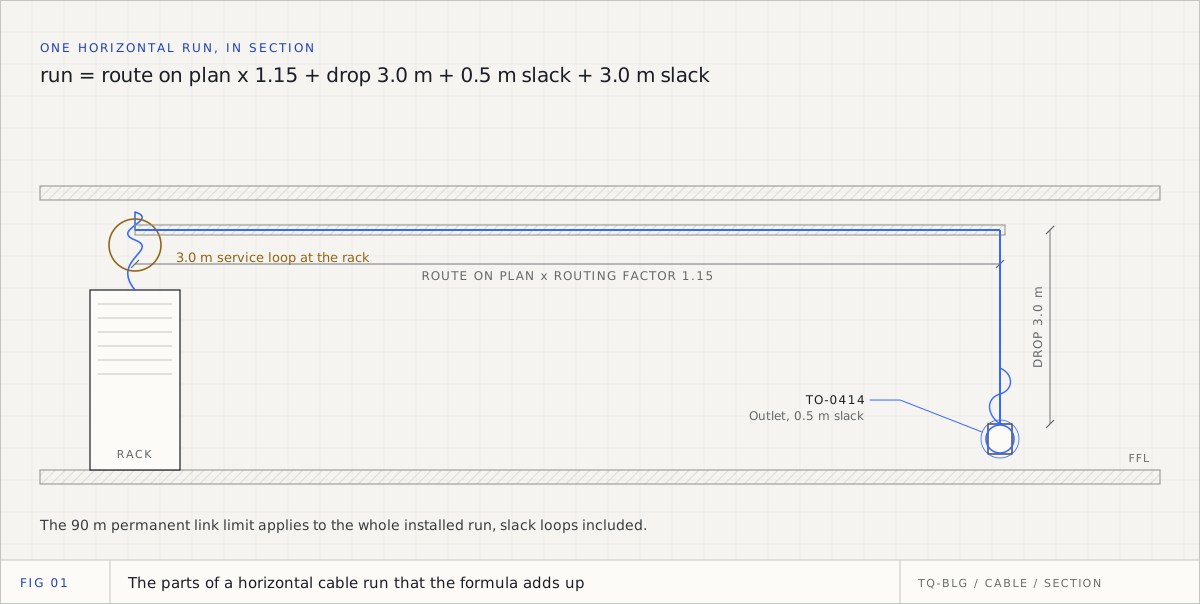
ELV cable calculation: the method, the formula and a worked example
How to turn a floor plan into metres of cable and boxes to order: every term in the formula, which numbers are standards and which are habits, a worked metric example, and where fire alarm loops and PA lines need a different calculation.
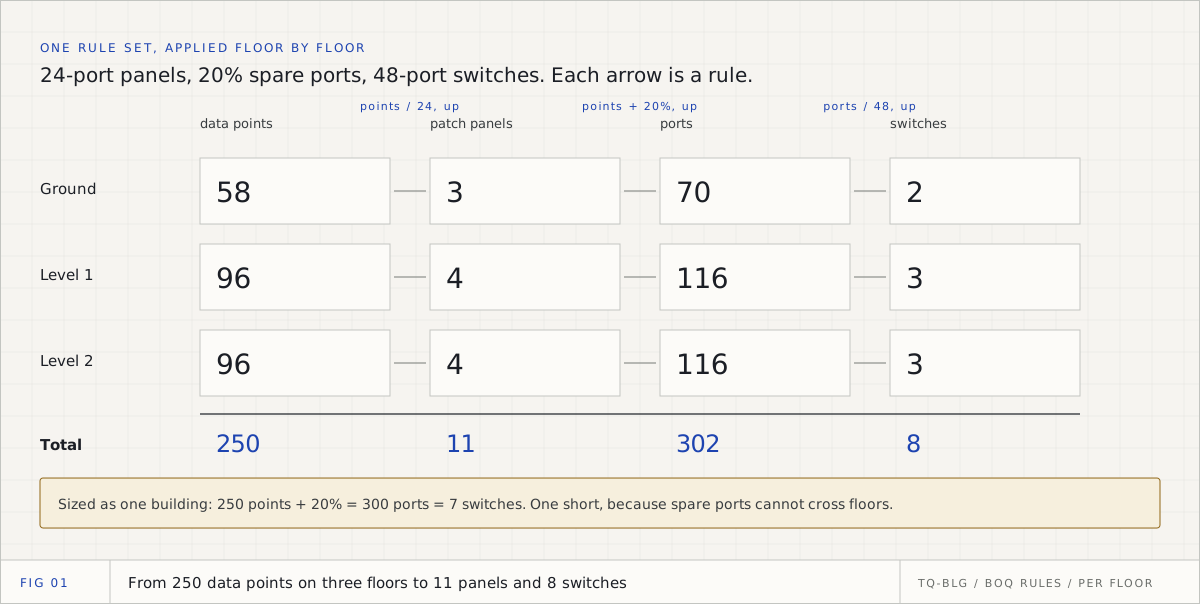
ELV estimating rules: how GCC contractors standardise the BOQ assumptions behind every derived line
The rules that turn counted devices into switches, patch panels, organisers, backbone and cable decide most of an ELV bill. How contractors in the UAE, Saudi and Qatar write them once per firm, override them per project with a reason, and trace every derived line to its formula, with a worked example.
CCTV BOQ in Dubai: how to take off cameras, recorders and storage to SIRA rules
A CCTV bill of quantities in Dubai is mostly lines that are not drawn: recorders, storage, switches, power, cable, the UPS. This is how to get each one from the camera count, and which numbers SIRA fixes for you.