
ELV take-off automation: what software can do, and what a person must still decide
Most of an ELV and security take-off can be automated: reading the drawings, counting tagged devices, deriving ports and panels, measuring cable, finding the cheapest vendor. Deciding is not. This is the chain, step by step, with a worked example of what a single unchecked miss does to the bill.
- Doc no
- TQ-BLG-261022-M5
- Rev
- Issued
- Author
- Zakaria Syed
- Category
- Software
- Reading
- 11 min
ELV take-off automation means software reads the tender drawings and proposes the counts, the derived quantities, the cable lengths and the prices, while a person checks each count and approves it before anything is priced. Almost every step of an ELV and security take-off can be automated except the decisions: what is in scope, whether a sheet is right, whether a typical floor really repeats, and who signs the quantities that go into a tender in Dubai, Riyadh or Doha.
This is the software chapter of the ELV quantity take-off guide. It walks the whole chain (read, review, approve, BOQ, cable, price, proposal) and says, at each step, what a machine can safely do and what it should only propose.
Manual, digital, automated: three different things
The word "automated" is used loosely in take-off software, so start by separating three ways of working.
| Way of working | How a count is made | Where the time goes | What still catches a miss |
|---|---|---|---|
| Manual | Print, highlight, tally on paper or in Excel | Counting, then retyping into the BOQ | A second person recounting |
| Digital | Click each symbol on screen; the tool keeps the tally | Clicking every symbol on every sheet | The same second person |
| Automated | The tool finds the symbols, from layers, blocks and tags or from one example | Reviewing what it found | Checks built into the tool, then a person |
Countfire drew the same line in a 2019 article: digital take-off still means "point and click" on each symbol, while automated take-off counts the symbols for you. The distinction matters because it moves the estimator's job. With automation, nobody should be clicking 1,000 cameras. Somebody should be looking at 1,000 cameras, quickly, and deciding which ones are wrong.
The chain, step by step
An ELV take-off is a chain of ten steps. Each one can be split into what software proposes and what a person decides.
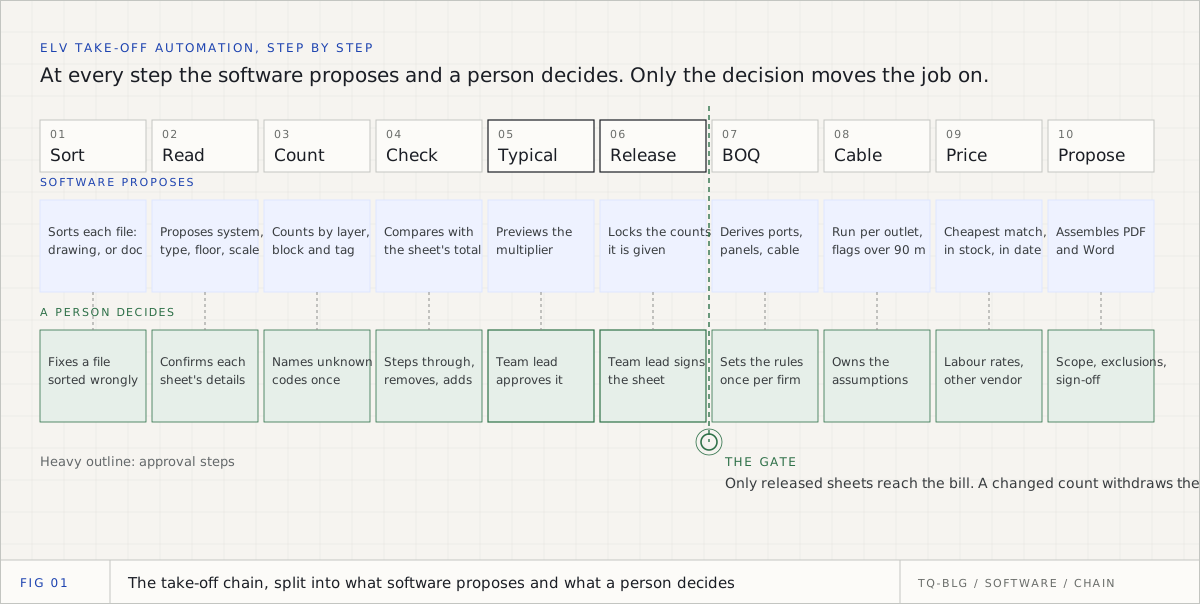
| Step | What software can do | What a person must decide | If you skip the person |
|---|---|---|---|
| 1. Sort the folder | Sort every file into drawings and documents, keep the specification for context | Correct a file sorted wrongly | A riser filed as a document is never read |
| 2. Read each sheet | Propose its system, drawing type, floor and scale from the title block | Confirm them | A wrong floor breaks every total that depends on it |
| 3. Count devices | Count from CAD layers, block names and tags; find copies of a boxed symbol | Name an unknown tag code, or a symbol nobody named | Two camera types merged into one line |
| 4. Check the counts | Compare with the sheet's printed total, flag odd floors and empty patches | Step through each device; remove, add | A labelled camera with no symbol is missed |
| 5. Typical floors | Preview the multiplier | Approve it, with a name | One miss multiplied by every floor |
| 6. Release | Lock the counts once released | Sign the sheet for pricing | Unchecked numbers reach the bill |
| 7. BOQ | Derive patch panels, organisers, switches, racks, backbone, cable | Set the rules once for the firm | Derived lines built on someone's guess |
| 8. Cable | A run per outlet, flag runs over 90 m | Own the routing factor, drops and slack | A 96 m run priced as if it worked |
| 9. Price | Take the cheapest matching vendor item that is in stock and in date | Labour rates, a preferred vendor, lines to quote | A guessed price hiding inside a total |
| 10. Proposal | Assemble the bill, summaries and drawings list | Scope, exclusions, validity, sign-off | A proposal nobody can defend |
Read down the right-hand column. Every failure there is quiet. None of them crashes anything; they just make a wrong number look finished. That is the case for keeping the person in the loop, and it is a practical one, not a philosophical one.
Steps 1 to 3: reading and counting
This is where automation earns most of its time back, and it depends almost entirely on the file you were sent. A CAD export can keep its layers: AutoCAD's PDF export has an option to add layer information to the PDF so layers can be turned on and off in the viewer. A PDF exported that way, or a DXF, still says which layer a camera sits on and which block it is, and a device tag such as CDC-L03-12 is selectable text. Software can read all of that without guessing.
A flattened export keeps the geometry and the text but loses the layers and blocks. A scan keeps only pixels. On those sheets the honest method is recognition: a person boxes one symbol, the software finds the others like it, and the person names the group once. The guide to difficult drawings covers how to diagnose a sheet and verify what you could not read cleanly.
The other thing a machine should never do on its own is resolve a tag code it has not seen. If a consultant writes CDC for a dome camera, a person should say so once, and every later sheet from that consultant should come in already typed. Guessing the meaning of an abbreviation is how "SD" becomes a smoke detector on an ELV sheet.
Steps 4 to 6: the checks and the gate
A count is a proposal until somebody has looked at it. The checks that work are the ones that do not depend on trusting the count:
- The sheet's own printed total. Many consultants print "Total cameras: 73" on the sheet. A count of 72 against a printed 73 is one missing device, and you know before you price it.
- Tags against symbols. A label with no symbol beside it is almost always a device drawn in an external reference, or not drawn at all.
- Floor against floor. A floor with no door contacts where its neighbours have twelve needs a second look.
- Plans against the riser. The riser shows what each floor connects; the plans should agree.
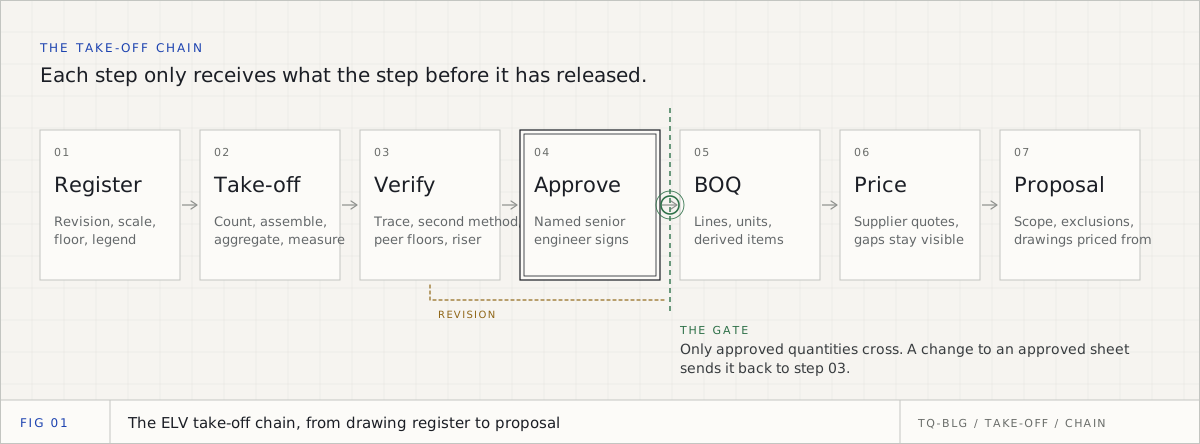
Then comes the gate. Only a released sheet should reach the bill, the release should carry a senior person's name, and a change to a count after release should withdraw it. Without the gate, automation simply delivers unchecked numbers to pricing faster.
The US National Institute of Standards and Technology puts the general principle plainly in its AI Risk Management Framework (January 2023): "Human-AI configurations can span from fully autonomous to fully manual," and some systems "specifically require human oversight." A take-off that becomes a priced tender commitment is one of them.
Steps 7 and 8: derived quantities and cable
Everything that is not drawn is derived: patch panels from outlets, switch ports from points plus spare, organisers from panels, cable from runs. This is arithmetic, and arithmetic should be automated, because it is where copy and paste errors hide in spreadsheets.
What should not be automated is the choice of rules. Ports per switch, spare percentage, the routing factor, drops and slack are firm decisions, written once, visible on every derived line, and changed on purpose. For the method behind run lengths, see the ELV cable calculation. The one hard limit software should always enforce is the copper channel: a 90 m permanent link inside a 100 m channel, as Fluke Networks explains. A run over 90 m is a design problem to raise, never a length to price.
Steps 9 and 10: pricing and the proposal
Software can match each BOQ line to the cheapest vendor item that matches, is in stock and is in date, and it can assemble the proposal. It should never invent a price. A line no vendor lists should stay open as "to quote", be listed under the total, and stop the total from looking complete. Labour, the client's approved vendor and the exclusions are a person's job.
Worked example: one missed camera on a typical sheet
Here is why the checks matter more than the counting speed. This is a worked example on an illustrative building, with example rules.
A tower has a typical floor sheet that stands for L02 to L09, eight floors. The sheet carries 48 data outlets and six cameras, CAM-T-01 to CAM-T-06, and prints "Total cameras: 6". CAM-T-06 is labelled but its symbol was never drawn. A count that only looks for symbols finds five.
The example rules: 24-port patch panels, 48-port switches with 20% spare ports, and a 30 m route per point with 10% slack.
| Quantity | Counted 5 (no check) | Checked 6 |
|---|---|---|
| Cameras per floor | 5 | 6 |
| Cameras across 8 floors | 40 | 48 |
| Points per floor (48 data + cameras) | 53 | 54 |
| Patch panels per floor (points / 24, rounded up) | 3 | 3 |
| Switch ports per floor (points + 20%, rounded up) | 64 | 65 |
| 48-port switches per floor | 2 | 2 |
| Cable per floor (points x 30 m x 1.10) | 1,749 m | 1,782 m |
| Cable across 8 floors | 13,992 m | 14,256 m |
The bill is short by 8 cameras and 264 m of cable. At an illustrative AED 685 a camera, that is AED 5,480 of cameras missing before cable, labour and storage, on one label. Worse, the patch panels and switches do not move, so nobody reviewing the derived lines would notice anything.
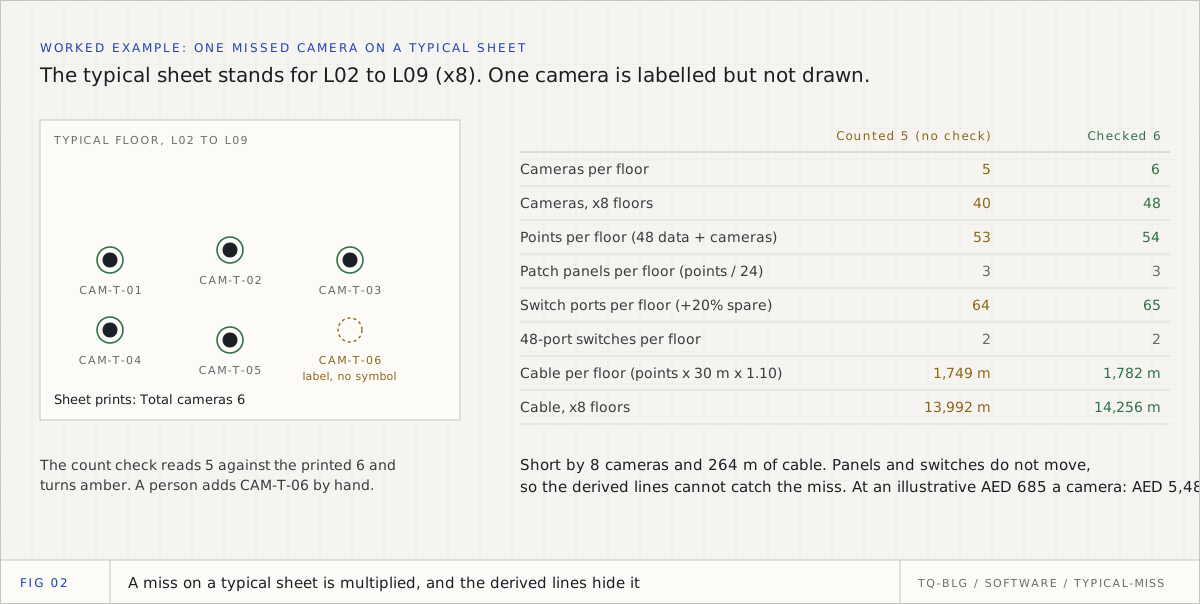
Two automated checks catch it. The count check reads 5 against the printed 6 and turns amber. The tag check sees CAM-T-06 with no symbol beside it. Both only point; a person adds the camera by hand, marked as placed by hand, and only then does the multiplier get approved.
What should stay manual, and why
Some things look automatable and should not be automated, because they are judgements a tender reviewer will ask a person to defend.
- Scope. Whether the car park CCTV, the gate barriers or the fire alarm interface are in your package is a contract question, not a drawing question.
- Conflicts between sheets. When the riser says 213 cameras and the plans say 172, software should show the gap. Deciding which is right is a tender query.
- Typical floor multipliers. A multiplier changes quantities a lot, so it needs a named approval, separate from saving it.
- The release for pricing. A count that goes into a tender should carry a senior person's name.
- Firm rules. Spare ports, switch size and cable allowances are your firm's standard. A tool should hold them, never choose them.
- Labour and commercial terms. Installation rates, margins, validity and exclusions belong to the estimator.
- The measurement convention. The contract decides it, whether that is a client's own method or the RICS New Rules of Measurement, and that decides how each line is described and measured.
ConstructConnect's August 2026 review of AI take-off reaches the same place from the general construction side: AI "can identify quantities, but it cannot decide what belongs in your scope."
How to judge an automated take-off tool
Before buying anything, run one of your own difficult tender sheets through it and check these:
- Does every count trace to a spot on the drawing you can click?
- Does a tick mean a person checked it, or that the software was confident?
- Does it compare its count with the sheet's printed totals and the riser?
- Does it say which sheets it could not read, instead of returning zero?
- Does it learn your consultants' tag codes, and can you change or remove what it learned?
- Are typical floor multipliers approved by a named person?
- Is approval enforced on the server, so a junior cannot release a sheet by mistake?
- Are the rules behind every derived line visible, per firm and per project?
- Does it leave unpriced lines open instead of guessing?
- Where are the drawings stored, and who can see them?
The 2026 comparison of take-off software for ELV contractors applies criteria like these to the tools on the market, with dated sources.
How TrueQty automates the chain
TrueQty is built around the split in the first figure: it proposes, and a person decides. The 90 second overview shows the whole job on a sample tender.
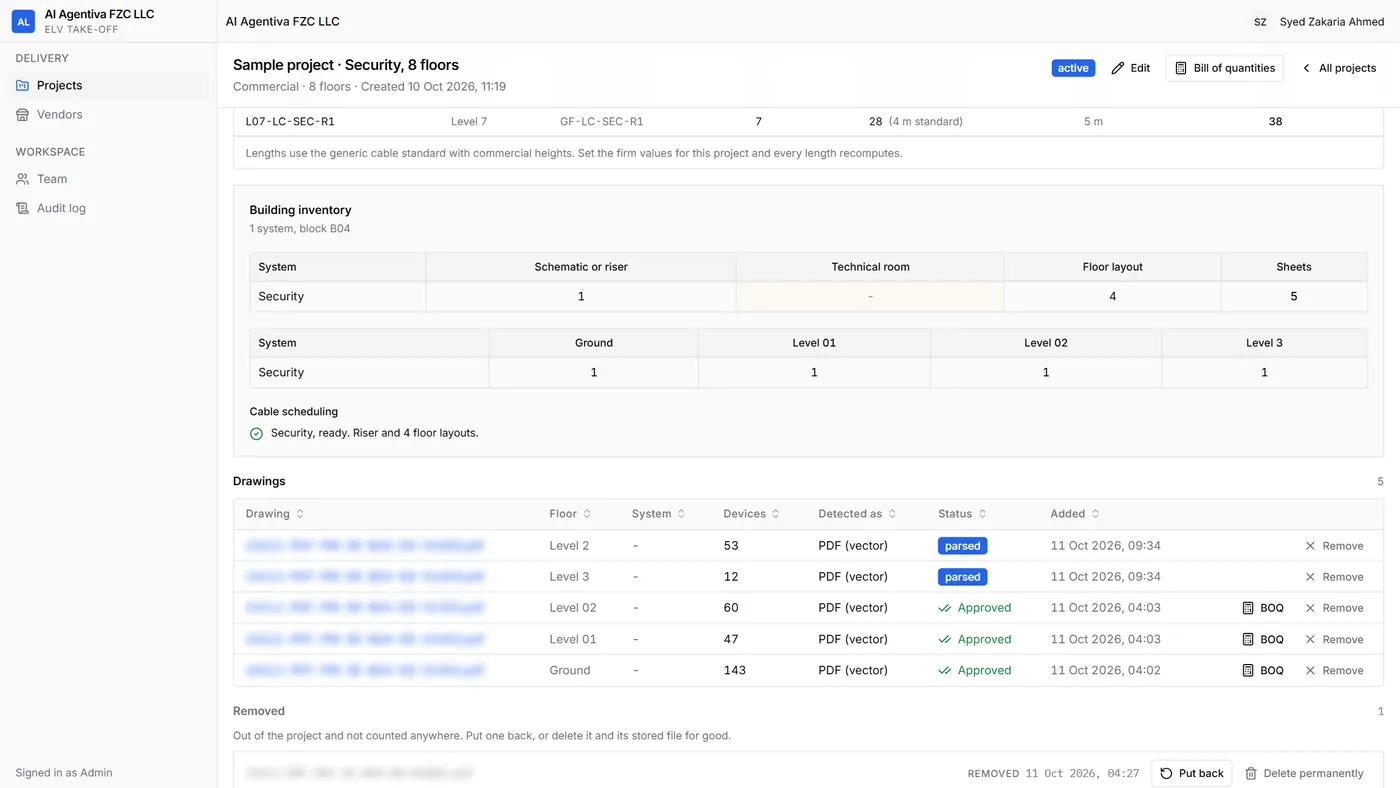
- Read. Upload the whole tender folder. Every file is sorted, drawings are read and documents are kept for context. Floor layouts are counted, and PDF works best: a vector PDF is read from the CAD layer names kept inside it, its tags and its door-hardware clusters. Risers and schematics are kept as reference. A DWG or DXF is read too but cannot be shown for checking, so export each CAD sheet to PDF and upload that. Scanned PDFs are accepted and marked for recognition: box one device, it finds the others like it, and a person names the set once. Each sheet's system, drawing type, floor and scale are proposed for you to confirm.
- Review. One category at a time, every device is circled where it was drawn, and you step through them with N, P and Enter. Take out what is wrong, and add a missed device by hand. A tick means a person checked it, never that the computer was sure. See Review a drawing.
- Check. The count check compares your count with the sheet's printed total or legend quantity, and warnings on each drawing say what to look at: a device named but not drawn, a floor unlike the others, no stated scale, a rack over capacity, and more.
- Learn. Teach a consultant's tag code once, and later sheets use it. Settings lists every learned code, with Change and Remove.
- Approve. Typical floor multipliers need approval. A team lead or admin sends each sheet for pricing, and only sheets sent for pricing reach the bill. A change to a count afterwards withdraws it. This is enforced on the server.
- Derive. The BOQ is generated from the drawings sent for pricing, cable included, with the formula visible on every derived line. It is versioned, from draft to issued, and exports to Excel. The rules behind it are set once per firm in Settings. See Generate the BOQ.
- Price and propose. Each line takes the cheapest vendor item that matches, is in stock and is in date. Lines it cannot price show the reason, and nothing is guessed. The proposal comes out as a PDF and a Word file in your brand.
Every count traces to a spot on the drawing, and a person approves it. The how it works page shows each step on real screens.
The short version
Automate the reading, the counting, the arithmetic and the matching. Keep the decisions with people, and make the tool show them exactly where to look. A take-off that is faster but unchecked is not automation; it is a faster way to submit a wrong tender. If you are pricing the security package itself, the companion piece on security systems estimating goes from these counts to a priced proposal.
Take off one real ELV sheet, with the evidence for every count on the drawing.
14 days, one full ELV tender, no card. Sign up with your work or personal email. You check every count, a team lead approves each sheet, and only approved sheets reach the BOQ.
Questions engineers ask
- Q01What is automated take-off?
- Automated take-off is software that finds and counts the items on a drawing for you, instead of you clicking each symbol. On ELV drawings it reads CAD layers, block names and device tags, or finds every copy of a symbol you point at once. The output is a proposed count that a person still checks and approves before it is priced.
- Q02Can an ELV take-off be fully automated?
- Not responsibly. Reading, counting, deriving and measuring can be automated on good drawings, but scope, conflicting sheets, typical floor multipliers and the release for pricing are decisions, and a tender needs a named person behind each one. The realistic goal is that a person checks every count quickly, not that nobody checks it.
- Q03What is the difference between digital and automated take-off?
- Digital take-off moves counting from paper to the screen, but you still click every symbol. Automated take-off finds the symbols for you, from the drawing's layers and tags or from one example symbol. Both still need a review step, because neither knows whether the consultant drew every device.
- Q04Which drawings work best for automated ELV take-off?
- Vector PDFs that still carry their CAD layers, and DXF files, because the device identity is inside the file. Flattened exports and scanned PDFs can still be counted, by finding repeated shapes and having a person name each group, but they need more review. Ask the consultant for a DXF or a layered PDF as a tender query when a key sheet is a scan.
- Q05Will automated take-off replace ELV estimators?
- No. It removes the clicking and the arithmetic, which is where much of an estimator's time goes, but the estimator still decides scope, resolves drawing conflicts, sets the rules behind derived quantities, prices labour and writes the exclusions. Automation moves the job from counting to checking and judging.
Sources
Every external fact in this document is cited to one of these, fetched when it was written.
- [01]NIST, Artificial Intelligence Risk Management Framework (AI RMF 1.0), NIST AI 100-1, January 2023nvlpubs.nist.gov
- [02]Countfire, Automated takeoff vs. digital takeoff: what's the difference? (11 February 2019)countfire.com
- [03]ConstructConnect, Are AI takeoffs accurate in 2026? (18 August 2026)constructconnect.com
- [04]Autodesk, AutoCAD LT 2026 Help, Export to PDF Options dialog box (layer information)help.autodesk.com
- [05]Fluke Networks, Say Goodbye to the Weakest Links (90 m permanent link, 100 m channel)flukenetworks.com
- [06]RICS, New Rules of Measurement (NRM)rics.org

Zakaria is a mechanical engineer and the co-founder and COO of AI Agentiva in Dubai. He builds TrueQty, and writes here about how ELV quantities are counted, checked and priced, and where take-offs go wrong.
Related documents
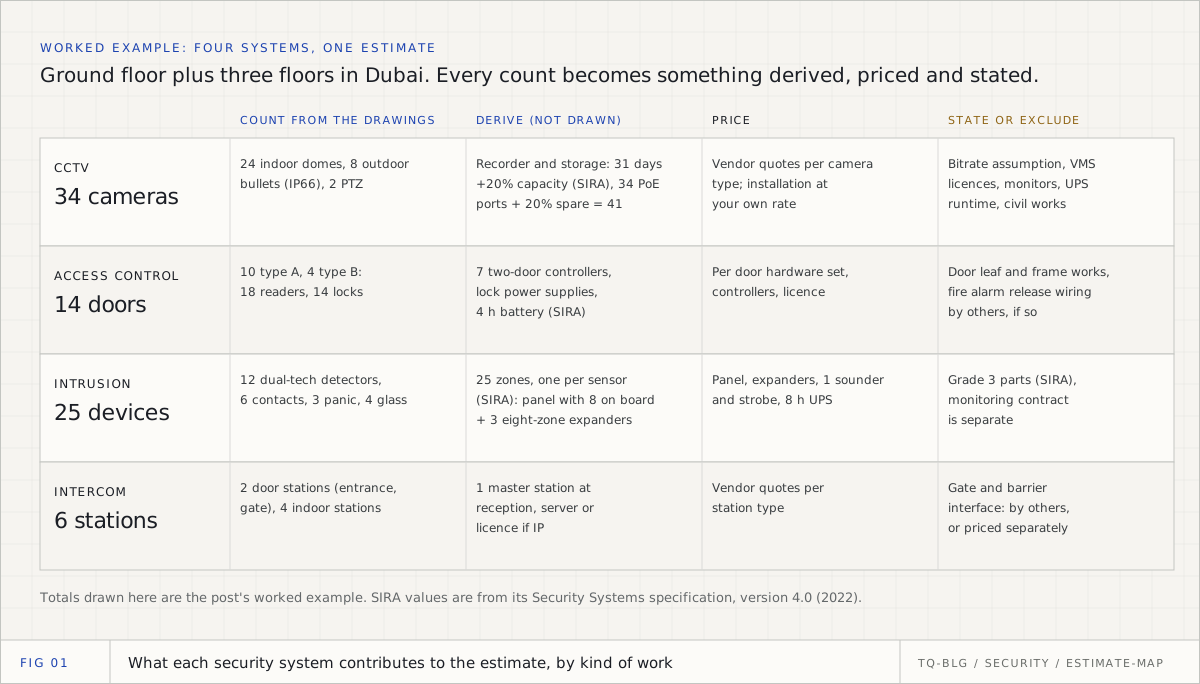
Security systems estimating: CCTV, access control, intrusion and intercom, from drawings to a priced bid
A security estimate is four kinds of work across four systems: count what is drawn, derive what is not, price both, and state what you excluded. This is the whole method for a GCC tender, with the SIRA rules that change the bill and a worked Dubai example from drawings to priced lines.
Quantity take-off software for ELV contractors in 2026: an honest comparison
The real options for an ELV estimating team in the GCC, from spreadsheets to general AI take-off tools to ELV-specific software, judged on the criteria that decide an ELV purchase. Vendor facts fetched from their own pages on 14 October 2026, with links, and TrueQty assessed with its limits.
ELV quantity take-off: the complete guide for GCC pre-sales engineers
An ELV take-off is not one count. It is six kinds of reasoning across CCTV, access control, cabling, fire alarm, PA and intercom, checked before any number is priced. This is the whole process, written for the engineer who has to defend it.